

Taking a day off, closing for a holiday, or shutting down for a week? Your hours live in a few places. Update all of them, or a customer will book a slot you're not there for.
1. Your booking calendar
Block the days so nobody can book them.
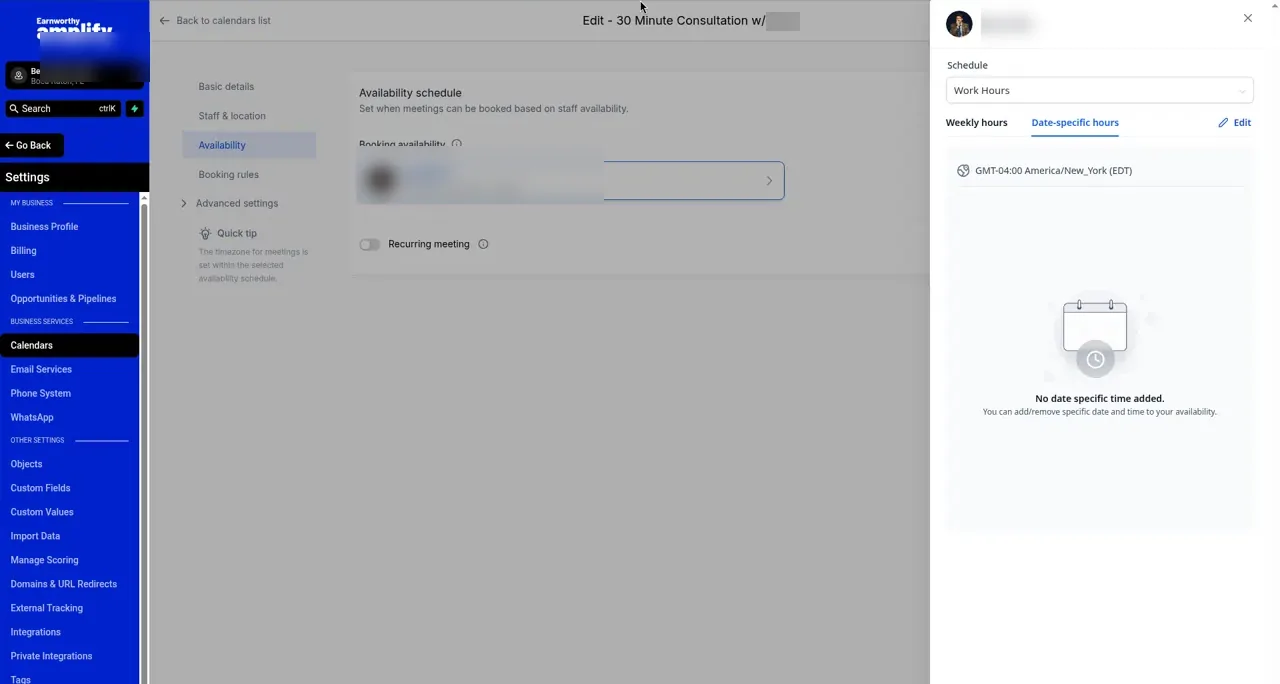
- Go to Calendars, then Calendar Settings, and open your calendar.
- Go to the Availability tab.
- Add Date-Specific Hours for the day or days you're closed, and mark yourself unavailable.
- Save.
More detail is in How to Set Your Booking Availability.
2. Your Google Business Profile
Google lets you set special hours for holidays, so people searching see you're closed.
- Open your Business Profile on Google Search or Maps.
- Select Edit profile, then Hours.
- Add special hours for the date and mark it closed, or set the shorter hours.
- Save.
3. Your AI and your website
If your AI answers questions about your hours, tell it about the closure. See Controlling What Your AI Says. If your website lists hours or a holiday notice, update that too, or ask us.
The easy way
Email support@earnworthy.com with the dates and what you want customers to hear. We'll update what we manage.
FAQ
What about appointments already booked on those days?
Blocking the days doesn't cancel existing appointments. Reach out to those customers and reschedule.
Do I need to undo it afterward?
Not for one-off dates. Date-specific hours and Google's special hours only apply to the dates you pick.
My regular hours changed for good. Same steps?
Change your weekly hours instead, and update Google's regular hours. Tell us so we can update your website and custom values.