

Connect Facebook and Instagram, and messages from both land in your Amplify inbox next to your texts and emails. It's also what lets us post your 5-star reviews to social.
Before you start
- You need Admin access to your Facebook Page. Editor access isn't enough.
- Your Instagram needs to be a business or professional account linked to that Facebook Page.
Connect it
- Go to Settings, then Integrations (that's the label in the app).
- Find the Facebook and Instagram card and click Connect.
- Log in to Facebook in the pop-up.
- Allow every permission it asks for.
- Pick your business Page and finish.
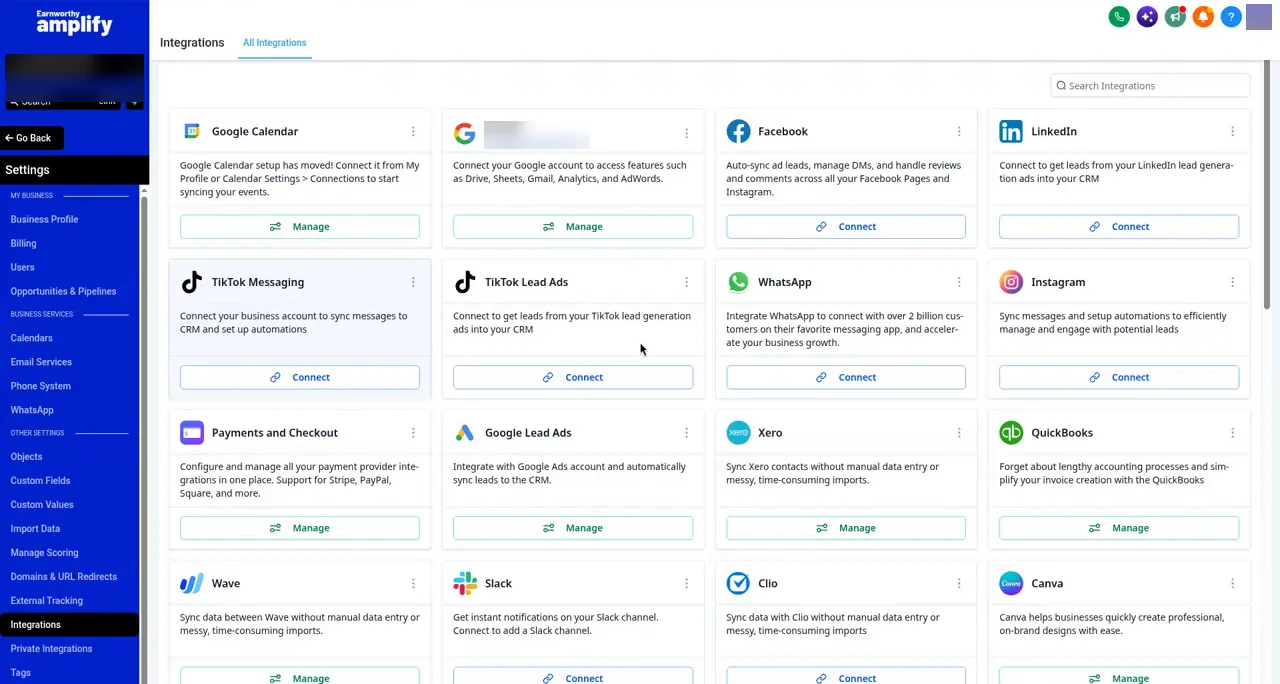
Instagram comes along when it's linked to the Page you picked.
Page not in the list?
Check that you're logged into the right Facebook profile and that it has Admin access to the Page. If access changed recently, disconnect and connect again.
FAQ
Messages are coming in, but they don't show as unread.
There's a setting for that. See Facebook and Instagram Messages Not Showing as Unread?
How do my reviews get posted to social?
See Share Your 5-Star Reviews on Facebook and Instagram Automatically.
Still stuck?
Email support@earnworthy.com with a screenshot of what you see.
Next step: Importing Your Contacts.